Activity & reports lists every scan your gates recorded, newest first, and explains each denial in plain words with a link to the right fix. Reports sums up a date range by reader, zone, day and hour, and finds credentials nobody uses. Both are read-only.
Menus: steps show the app launcher first and the classic menu in brackets. See Find your way around to tell which one you have.
Who this is for
Owners and admins. Export buttons are for owners and admins.
Steps
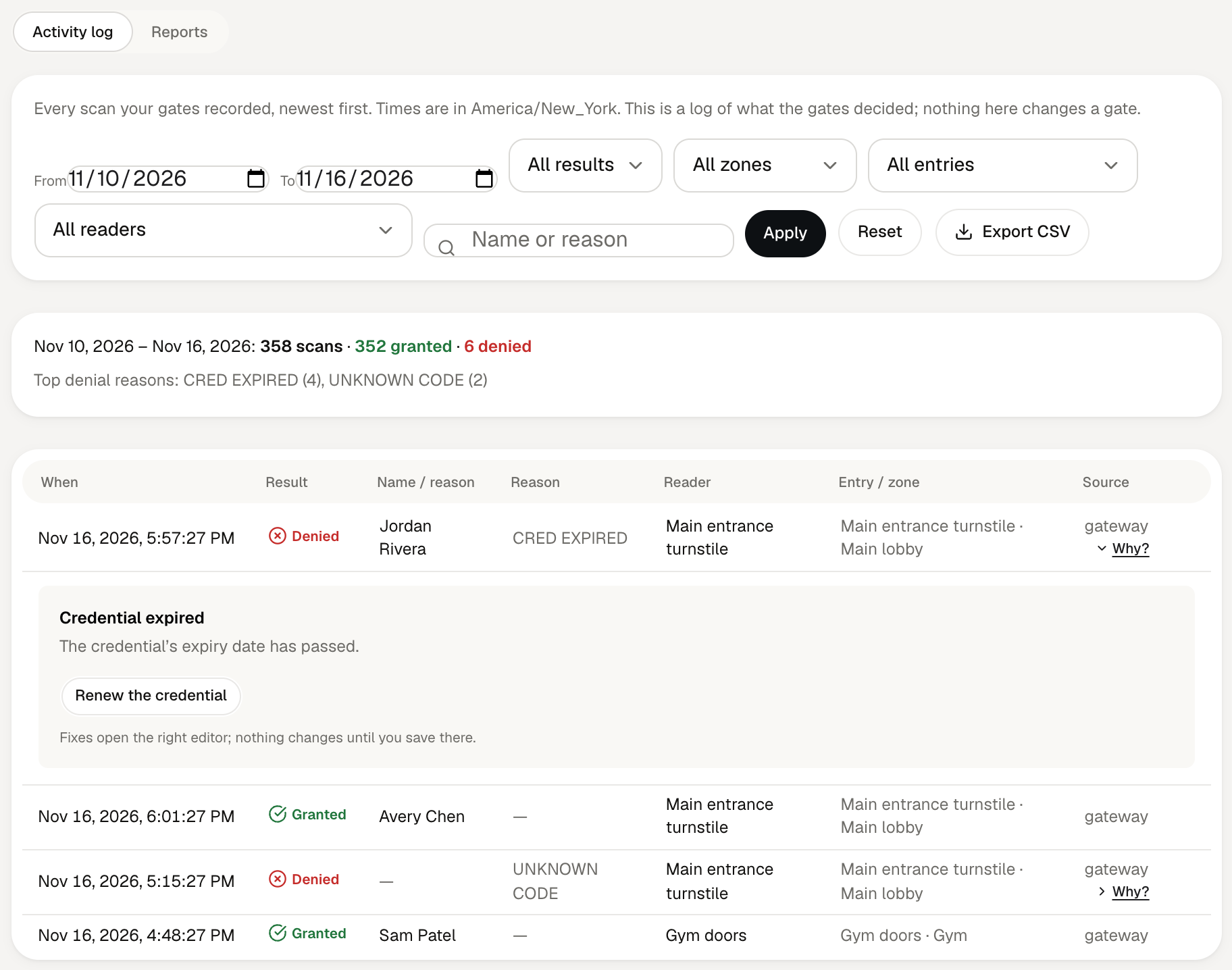
Find a scan
- Open Apps › Access › Activity (classic menu: Configure › Access control › Activity & reports). Activity log is selected.
- Set From and To (the last 7 days by default; up to 92 days).
- Narrow with All results (Granted, Denied, Review), All zones, All entries, All readers, or search Name or reason.
- Click Apply. Reset clears the filters.
- The summary shows total scans, granted, denied and the top denial reasons. Click Load more at the bottom for older scans.
See why a scan was denied
- On a denied row, click Why? (on a phone: Why was this denied?).
- Read the explanation and use the button under it, for example Renew the credential. Fixes open the right editor; nothing changes until you save there.
Export
- Click Export CSV for the current filters. Up to 10,000 scans; if the range has more, you get the newest 10,000.
Common denial reasons
| Explanation | What it means | Fix |
|---|---|---|
| Code not recognised | The code doesn't match any credential, pass or registration here. Often another system's code, a screenshot of an old pass, or a mis-read. | Issue a credential |
| Credential expired | Its expiry date has passed. | Renew the credential |
| Credential not active | It's suspended or revoked. | Reactivate the credential |
| Event already over / Event not open yet | The pass is for an event outside its window. Passes work from 30 minutes before the start until 30 minutes after the end. | Open the event |
| Single-use pass already used | The pass let one person in once already. | Open the person |
| Watchlist match | The holder matched your watchlist. A guard should handle it in person. | Open the watchlist |
| Background check not cleared | The holder's check failed or isn't complete. | Open the background check |
| Belongs to another organization | Valid code, wrong organization. | — |
| Reader could not reach the server | The reader lost its connection and refused. | Check the reader's network |
| Allowed today, rules would deny | The gate let the scan in; the access rules being observed here would have refused it. | The buttons point to the group, schedule or credential access policy involved |
Reports
- Click Reports at the top of the tab.
- Pick From, To and Unused for (7, 14, 30, 60 or 90 days), then click Apply.
- Read the totals (Scans, Granted, Denied, Unused credentials) and the sections: By reader, By zone, By day, By hour of day, Denial reasons, Most frequent people, and Credentials not used in N days.
- Each section has its own CSV export.
Troubleshooting
- "Pick at most 92 days" → shorten the range.
- Entry / zone says "Not registered" → the reader isn't on the map → register it on Places.
- No Why? link on a denial → only some denials have an explanation; the reason column still shows what the gate said.
- Times look off → times are in your organization's time zone, shown at the top of the log.